The board
The board (the Kanban view) shows every agent of the active product as a card. It is driven by Claude Code hooks, not by scraping the terminal: each agent's hooks post to the daemon, and the card moves when they do.
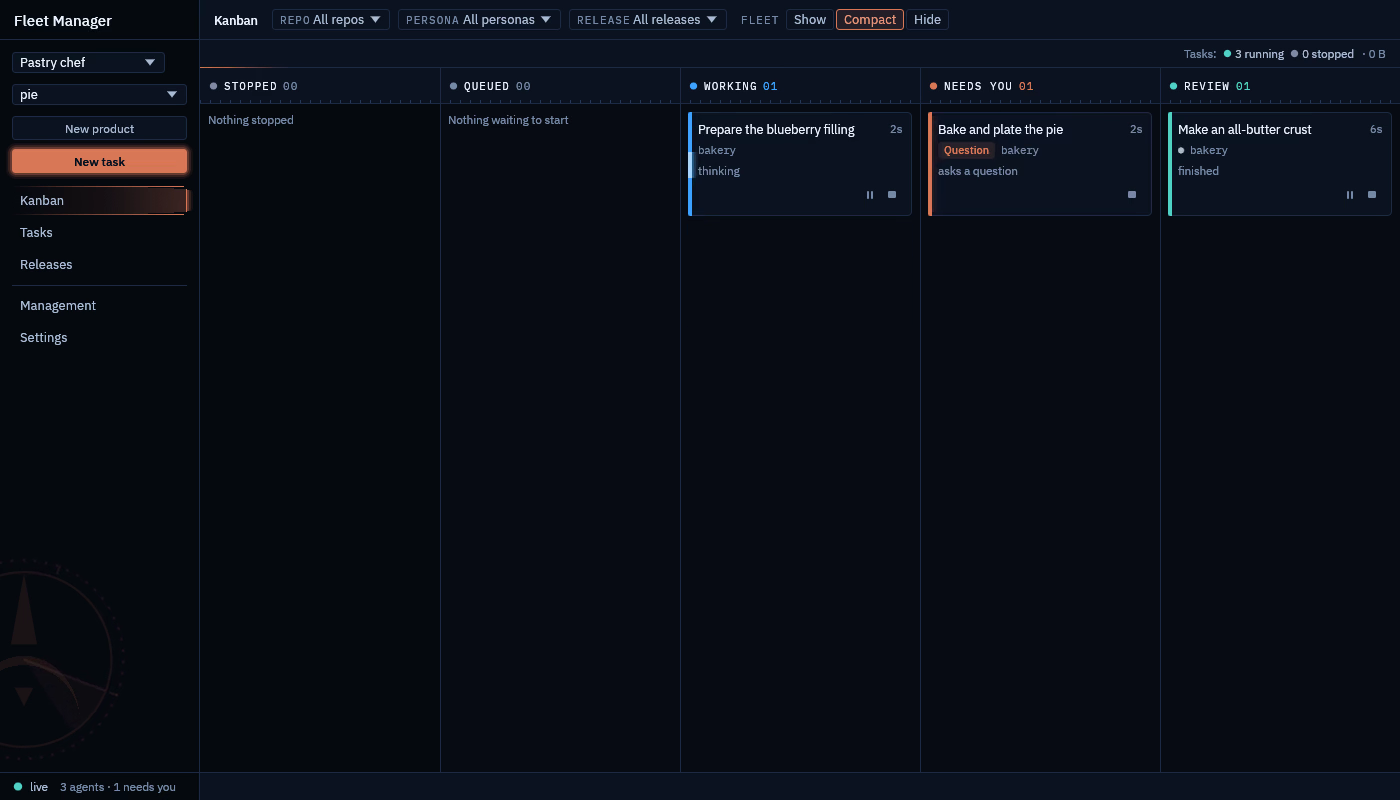
Columns
| Column | What the agent is doing |
|---|---|
| Stopped | Not running any more. The card says why: stopped by you, exited, crashed, or finished its step. |
| Queued | Started, and Claude Code has not reported in yet. |
| Working | Thinking or running a tool. |
| Needs you | Waiting on you. |
| Review | Finished its turn; read what it did. |
How a card moves between them:
stateDiagram-v2
    state "Needs you" as NeedsYou
    [*] --> Queued: New task
    Queued --> Working: session starts
    Queued --> NeedsYou: silent at startup
    Working --> NeedsYou: permission, question, error, repo access, breakdown
    NeedsYou --> Working: answered
    Working --> Review: turn finished
    Review --> Working: new prompt
    Queued --> Stopped
    Working --> Stopped
    NeedsYou --> Stopped
    Review --> Stopped: Stop, exit, crash, step finished
Why a card needs you
A card in Needs you says why:
- Permission needed: Claude Code asks before running a tool.
- Question: the agent asks you something.
- Error: the turn stopped with an error.
- Startup prompt: no hook arrived within the startup grace period, which usually means Claude's "trust this folder" dialog is up.
- Repo access: the agent asked for another repo; grant or refuse it from the card.
- Breakdown to review: an orchestrator proposed steps; see Orchestrated tasks.
Act from the card
Answer, pause, resume, stop. Answer is offered on Needs you (except a repo-access request, which is granted or refused); Pause on Working and Review; Stop on any card that is still running.
The side panel shows the agent's live terminal (read-only) and the diff of every repo in the task, plus the breakdown for an orchestrated task. Open in terminal in the panel takes over the agent's terminal in a window of its own; see below.
The board can be filtered by repo, by persona and by release.
A Working card's edge sweeps and a Needs you card's edge pulses while the window has focus; Settings → General → Motion turns that off.
Agents outlive the app
Each agent runs as the interactive claude CLI in a terminal session the daemon owns. Close the window and choose
Keep the daemon running: the agents keep working, and the board is where you left it when you come back. If you
stop the daemon instead, running agents stop and are resumed (claude --resume) the next time it starts.
To type into an agent's terminal yourself, click Open in terminal in its side panel, or run fleet-attach
from the app folder:
fleet-attach <agent id> # Ctrl-] detaches; the agent keeps running
Open in terminal is offered only while the agent runs and the daemon is on this machine.